Loupa Patient

Inside a Loupa patient pathway.

Clinically approved information, practical guidance and simple tools that help patients navigate, prepare and participate in their care.

Navigate Understand Ask Prepare Return
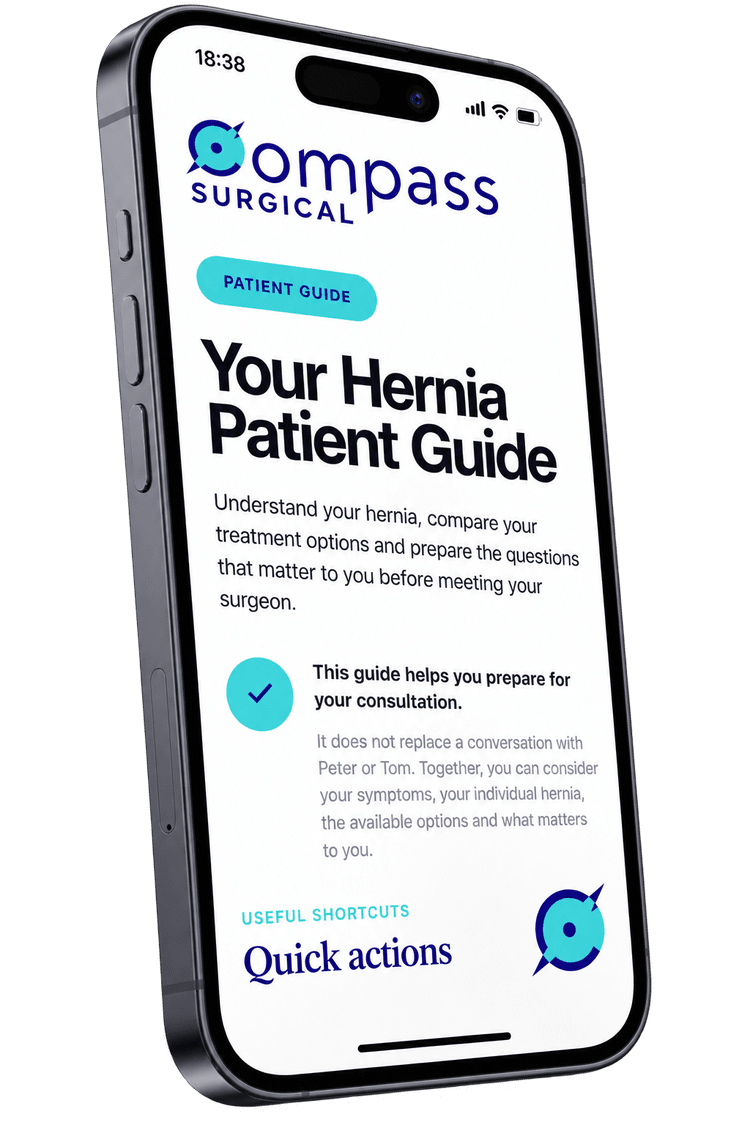
Loupa hernia patient pathway displayed on an iPhone
Patient journey Know where you are. See what has happened and what comes next.
Participation Save what you want to discuss. Questions and priorities stay available for later.
Example from a live Loupa pathway
The patient experience

More than information on a screen.

A Loupa pathway brings clinical information, practical guidance and patient interaction into one experience that can be used across care.

01

Find my way

See the journey, find the right section and know what comes next.

Explore
02

Understand

Read clinical information in clear, manageable sections that can be revisited.

Explore
03

Participate

Save questions, identify priorities and prepare for the next clinical conversation.

Explore
04

Prepare and connect

Keep practical instructions, contacts and getting-help information close at hand.

Explore
05

Return when needed

Revisit the pathway as questions, decisions and practical needs change.

Explore

The pathway stays familiar while the information changes with the stage of care. The sections below show how those patient functions work in practice.

Find my way

Help me know where I am and what comes next.

Loupa gives patients a clear route through the pathway, with important information and actions easy to find when they are needed.

Example from the live Compass Surgical hernia pathway
Useful shortcuts

Quick actions

Call Compass
Contents
Directions
My questions
Share this guide
Ready for consultation?
Explore the guide

Your hernia journey

Work through the guide in order, or go straight to the section most useful to you.

01 Understanding your hernia What it is, symptoms and when to seek help
02 Your treatment options Watchful waiting, surgery and types of repair
03 Understanding the risks Recovery, complications and individual risk
04 Preparing for your consultation Your priorities, concerns and questions
05 Getting ready for surgery Fasting, medicines and what happens on the day
06 Recovery and follow-up Recovery, activity and when to get help
Not every hernia needs an operation.

The consultation is a chance to understand the options, benefits and risks before deciding what is right for the patient.

The pathway stays visible.

Patients can see the stages of care, move directly to the information they need and keep common actions close at hand.

01
See the journey The contents reflect the clinical pathway rather than presenting information as one long document.
02
Go straight to what matters now Patients can move between chapters and return to individual sections without starting again.
03
Keep common actions close Calling the service, finding directions, reviewing questions and preparing for the next conversation can remain easy to reach.
Real product example

The interface shown here is adapted directly from the live Compass Surgical hernia patient pathway.

Understand

Information designed to be understood and revisited.

Loupa breaks clinical information into clear, purposeful components so patients can absorb what is useful now and return to the detail when they need it.

Different information needs different treatment.

A definition, a list of symptoms, a warning sign and a decision point should not all look like the same paragraph. Loupa uses different visual patterns to make the role of each piece of information clearer.

01
Break information into manageable sections Patients can read a short section, stop, and return later without having to work through one long document.
02
Give different information a different visual role Explanations, choices, practical points and warning signs can each be presented in a format suited to their purpose.
03
Make safety information easy to recognise Urgent changes and safety-netting can be visually separated from routine educational content.
04
Lead naturally to the next question The pathway can move from understanding a condition to considering options, risks, preparation and the next clinical conversation.

The aim is not to make clinical information shorter at all costs. It is to make the information easier to navigate, interpret and return to.

Example from the live Compass Surgical hernia pathway
Different locations

What type of hernia do I have?

Hernias are named according to where the weakness occurs. The location can influence symptoms and treatment options.

Groin

Inguinal hernia

A hernia in the groin that may cause a lump, aching or discomfort.

Belly button

Umbilical hernia

A weakness at or close to the belly button, often seen as a visible bulge.

Upper abdomen

Epigastric hernia

A weakness in the midline of the upper abdominal wall.

Previous operation

Incisional hernia

A hernia developing at or close to a previous surgical incision.

What symptoms can a hernia cause?

A visible or noticeable lump
Aching or discomfort around the hernia
Symptoms during lifting, coughing or exercise
A feeling of pressure, pulling or heaviness
A common question

What does “reducible” mean?

A reducible hernia is one where the contents can move back through the opening in the abdominal wall, either by themselves or with gentle pressure.

It may therefore be more obvious when standing and much less noticeable when lying down.

Seek urgent assessment

What changes should I take seriously?

A hernia that suddenly becomes very painful, firm, increasingly swollen or no longer goes back in needs prompt medical assessment.

Severe or rapidly worsening symptoms need urgent medical care rather than waiting for a routine appointment.

The next question

Does having a hernia mean it needs treatment?

Not necessarily. The next chapter looks at when observation may be reasonable and when treatment becomes more worthwhile.

Demonstration adapted from the live Compass Surgical hernia patient pathway. Clinical content has been shortened here to demonstrate the information design.

Participate

Turn reflection into something the patient can bring back.

Patients often think of questions, concerns and priorities after the clinical conversation. Loupa gives them simple ways to capture those thoughts and prepare for the next one.

01 A question arises

While reading, reflecting or talking with whānau.

02 Save it

Keep it with the rest of the pathway.

03 Identify priorities

Think about what matters most before deciding.

04 Bring it back

Use the workspace to support the next discussion.

Questions are part of the consultation, not a failure of it.

Loupa makes space for patients to keep thinking between clinical conversations and gives those thoughts somewhere useful to go.

01
Prompt without prescribing Suggested questions can help patients recognise topics they may want to discuss while still allowing them to add their own.
02
Make values visible “What matters to me” prompts recognise that treatment decisions depend on symptoms, priorities, activities and concerns as well as clinical facts.
03
Keep questions together A consultation workspace brings saved questions and priorities back together when the patient is ready to discuss them.
04
Distinguish saved from discussed Questions can be marked as discussed so the patient can see what still needs attention.

The technology does not make the decision. It helps the patient arrive at the next conversation with clearer questions and a better sense of what matters to them.

Interactive example adapted from the Compass Surgical hernia pathway
Questions you may want to ask

Save a question for your appointment

Try saving one or more questions below.

What matters to you?

What would make treatment worthwhile?

Choose any priorities that feel important.

0 selected
Before you meet your surgeon

Ready for your consultation?

Review what matters to you and the questions you still want to discuss.

Your priorities

What matters to me

Choose a priority above to see it here.

For your appointment

My questions

0 to discuss

Save a question above to see it here.

This demonstration does not save or send anything. In a configured Loupa patient pathway, saved questions and priorities can remain on the patient's own device.

Stay connected

If questions remain, give patients a route back.

Reflection does not always finish when the consultation ends. Where a service supports it, Loupa can help patients signal that they still have questions they would like to discuss.

Close the loop between thinking and talking.

A saved question is useful, but only if there is an opportunity to bring it back into care. Loupa can make that next step visible.

01
Questions remain The patient can see which saved questions are still marked as undiscussed.
02
A route back becomes visible The pathway can offer a simple way to let the healthcare team know that further discussion is wanted.
03
The patient stays in control Their own email app opens with a generic message that they can review before deciding whether to send it.
04
The conversation returns to people The healthcare service decides how questions are triaged, answered and documented.
Technology prepares. Healthcare professionals provide care.

Loupa can create a clearer pathway back to the team. It does not replace clinical judgement, communication or the final consent process.

Example adapted from the live Compass Surgical hernia pathway
Questions still to discuss?

Let your surgical team know

You have 2 saved questions that have not yet been marked as discussed.

If you would like these addressed before your operation, you can let the Compass Surgical team know. Your saved questions stay on this device and are not sent automatically.

In the live pathway, this opens the patient's own email app. This demonstration only shows the message preview.

01 Questions stay local

The saved question text is not inserted into the email.

02 Patient initiates contact

Their own email app opens and they decide whether to send.

03 Service closes the loop

Follow-up, escalation and clinical documentation remain the responsibility of the healthcare service.

Prepare · Navigate · Recover

Reduce avoidable uncertainty.

Some uncertainty needs a clinician. Some simply comes from not knowing where to go, what will happen next, who will be there or whom to call.

Clinical uncertainty

This belongs in the conversation.

Should I have treatment? What happens if I wait? What does this risk mean for me?

Avoidable uncertainty

Much of this can be cleared in advance.

Where do I park? Which entrance do I use? What will recovery feel like? Who do I call if I am worried later?

Clear the practical uncertainty before it competes with the clinical conversation.

A bespoke pathway can answer the questions that do not require clinical judgement, leaving more attention for the decisions that do.

01
Make the pathway local Show the actual clinic, recovery area, entrances, contact details and people the patient may meet, rather than generic stock information.
02
Explain what the experience may feel like Practical steps can be paired with sensory detail so patients know not only what will happen, but what they may notice when it does.
03
Keep practical information close Directions, contact numbers, recovery advice and safety-netting remain available on the device the patient is already carrying.

Where the information lives matters. A phone is with the patient in the car park when they cannot remember the entrance, and at 2am when something about recovery worries them.

Example from a locally configured surgical pathway
Recovery bay photograph

Insert actual Compass Surgical recovery-area image here

The actual recovery area A photograph gives the patient a visual map.

Local images help make the unfamiliar more recognisable before the patient arrives.

What might it feel like? Waking after your operation

You may feel drowsy and have a dry mouth. The recovery area may feel bright and busy at first. A nurse will be nearby, may ask your name again, and will check how you are feeling as you wake.

Directions Find the right entrance
Call the team Local contact details
Who you may meet Real people and roles
Recovery guidance What to expect at home
Still available later Practical information stays with the patient.

Directions before arrival, preparation on the day, and contact and recovery information afterwards can all remain accessible from the same pathway.

Patient-controlled interaction

Useful interaction with clear data boundaries.

Patients can save questions, identify priorities and prepare for a conversation without every thought needing to become centrally stored patient data.

Not every patient interaction needs to become another record.

Loupa separates patient reflection from clinical communication, so the patient can use the pathway actively while remaining clear about what stays with them and what is shared.

01
No account required Core patient tools can work without asking the patient to create another username, password or profile.
02
Reflection can stay on the device Saved questions, priorities and discussed status can remain available to the patient without being automatically transmitted.
03
Sharing is an intentional action When the patient chooses to reconnect, they remain in control of whether a message is actually sent.
04
The clinical record stays clinical Relevant advice, decisions and consent discussions remain the responsibility of the healthcare service to document in its own systems.

Patient preparation is not the clinical record. Loupa helps the patient prepare for communication. The provider remains responsible for the clinical conversation, documentation and final consent.

Example of the patient-controlled data boundary
On the patient's device Personal preparation stays close to the patient.
My questions Questions I want to ask

Saved for the next conversation.

My priorities What matters to me

Values and concerns I want to remember.

My progress Discussed or still to discuss

A patient-controlled preparation aid.

Patient chooses if something crosses this boundary
Deliberate action Let my healthcare team know

The patient's own email app can open with a generic message stating that outstanding questions remain. The saved question text itself does not need to be inserted into the message.

Patient reviews before sending
Healthcare service Once the patient reconnects, the clinical pathway takes over.
01
Receive

Monitor the agreed contact route so the patient's request reaches the service.

02
Respond

Clarify the concern, provide advice or arrange further clinical discussion.

03
Document

Record clinically relevant communication and decisions in the service's own systems.

Loupa provides the route back. The healthcare service remains responsible for receiving, responding to and documenting the clinical communication.

Loupa can support

Preparation, reflection and a clearer route back.

Controlled information, saved questions, priorities, patient feedback and deliberate contact with the care team.

The healthcare service owns

Individual advice, documentation and consent.

Patient-specific interpretation, answering questions, changed treatment plans, clinical records and the final informed consent process remain with the treating team.

Learn and improve

If the explanation is not landing, improve the explanation.

Patient information should not become static once it is published. Simple feedback and understanding prompts can help identify where an explanation may deserve another look.

The patient should not be the only thing being assessed.

Loupa can ask whether an explanation was useful and whether a core idea landed, without turning patient education into an exam.

01
Ask whether the section helped A simple Helpful or Not yet response gives patients an immediate way to report how useful an explanation felt to them.
02
Check one important idea A brief, non-scored understanding prompt can reinforce the main message or direct the patient back to an explanation that deserves another look.
03
Look for patterns, not individual blame Repeated signals from the same chapter can identify content that may warrant clinical and editorial review.
04
Improve through governance Feedback can trigger review, but revised clinical content still requires controlled approval before publication.

Feedback is a signal, not proof. A click, a completed chapter or a correct answer does not establish that informed consent has occurred.

Interactive example adapted from the Compass Surgical hernia pathway
Quick feedback

Was this section helpful?

Your feedback helps us improve this guide.

Quick check

Check your understanding

This is not a test. Choose the answer that best reflects the main message.

How is the decision about hernia surgery usually made?
No score. No pass or fail.

The purpose is to reinforce the explanation or identify something worth revisiting, not to certify understanding or consent.

From feedback to improvement

The pathway can report back on itself.

Individual responses become useful when patterns help the service identify where patient information may need review.

01 Observe

Collect simple signals about usefulness, engagement and key understanding prompts.

02 Review

Look for recurring patterns rather than interpreting one patient's response in isolation.

03 Improve

Refine wording, structure, emphasis or supporting explanation where the evidence suggests it is needed.

04 Re-approve

Updated clinical content returns through the agreed review and version-control process before publication.

Useful signal Patterns can guide improvement.

Helpful / Not yet responses, understanding prompts and engagement data can identify areas worth examining.

Important boundary Analytics do not establish consent.

Completion, engagement or a correct answer cannot replace the patient-specific clinical conversation and documentation required for informed consent.

See it in practice

Explore a live patient pathway.

Loupa combines clinically approved information, practical preparation and patient participation in pathways designed around the care patients are actually receiving.

Compass Surgical hernia patient pathway displayed on an iPhone
Compass Surgical

Hernia patient pathway

Supports the patient after specialist assessment as they consider treatment options, risks, recovery and questions they want to bring back to their surgeon.

Treatment choices Saved questions Personal priorities
Open live pathway
Compass Surgical gallbladder patient pathway displayed on an iPhone
Compass Surgical

Gallbladder patient pathway

Helps patients understand gallstone disease, when surgery may be appropriate, material risks and what to expect before and after treatment.

Treatment choices Risks explained Recovery planning
Open live pathway
MacMurray gastroscopy patient pathway displayed on an iPhone
MacMurray

Gastroscopy patient pathway

Prepares patients for gastroscopy with procedure information, fasting and medication guidance, what happens on the day, results, risks and clear routes for getting help.

Preparation Procedure day Results and help
Open live pathway
Pathway specific The right information at the right point in care.

A surgical pathway may begin after specialist assessment, while a direct-to-test procedure such as gastroscopy may appropriately provide preparation information before the procedure. Loupa is configured around the clinical pathway, not a single fixed sequence.

Build a pathway

Turn patient information into part of the clinical pathway.

Loupa works with healthcare services to structure, personalise and govern patient information around the decisions, preparation and practical questions patients face in real care.

Built around real clinical pathways, not generic patient information.